 kōan
Equalisation and convolution
kōan can correct headphones, speakers and rooms on its own output, with filters designed elsewhere: headphone and IEM EQ from AutoEQ or squig.link, for players and DACs with no EQ of their own; room-correction impulse responses from REW, rePhase, Acourate, Audiolense or Home Audio Fidelity, Roon filter packs, CamillaDSP and Equalizer APO setups. A correction belongs to output devices, so plugging in the headphones selects theirs, and a device with nothing chosen plays bit-perfect as before.
The processing runs on the decode thread, before the ring buffer, so the audio callback is the same whether anything is processed or not. A device that is flat, with no correction and no tuning, runs nothing at all: the samples reach it untouched, and the terminal UI's format badge says when they did not ("FLAC 24/96 · FIR"). There is no switch to turn processing off; a device is made flat instead, and a preset brings back what it played.
Processing applies to this device's own output. When it controls another device, that device's settings apply.
A UPnP renderer is an output like any other and can have a correction or tuning of its own. Without either it is handed the original file, untouched. With either, kōan decodes and processes the queue itself and sends the renderer a single FLAC stream for as long as the format stays the same, dithered to the source's bit depth (24 bits for lossy sources). The renderer never changes track inside that stream, so gapless holds, and with a single convolution filter every track plays at the filter's rate and the stream never ends between tracks. Seeking opens a new stream at the new position. A renderer that cannot take FLAC is sent WAV; one that takes neither is handed the original file.
New to headphone EQ? Headphone EQ, explained covers measurements, targets and corrections, and which way to go for your headphones.
Importing
In the apps, Settings → Playback → EQ and convolution → Import… takes files, a folder or a zip. On iOS, files can also come from anywhere else: open one in kōan from Files or Mail, or choose kōan in the share sheet — a zip sent in a chat, or EQ text pasted into a message. A share is saved for the app and imported when kōan next comes to the front. On Android, a file or text shared to kōan from another app is imported the same way.
Several whole presets chosen together, such as Equalizer APO, AutoEQ or Qudelix files or CamillaDSP YAML, become a group: an EQ from each, named after its file, and a group holding them, named for what their names share. A group plays one member at a time. Pick which on its page ("Group: pick one"), on the EQ page, or in an output's preset menu. Any EQ that plays two or more others in order can be made a group, and a group such an EQ again. A group can be one of the EQs played, such as a group of corrections with a tuning on top.
Files that are parts of one EQ, such as an impulse response or a Convolver .cfg a file per channel or rate, a folder, a zip, or REW's file for each side, still combine into one. Before importing several files the app says which will happen and lets you name the result. A name already taken gets a number, AutoEQ's FixedBandEQ file is left out beside its ParametricEQ twin, and a file that cannot be read is named with why, without stopping the rest.
From the command line:
koan dsp import "Harman 780.zip" --device "Topping E30"From AutoEQ
AutoEQ's corrections can be found by headphone name instead of downloaded by hand. In the desktop, iOS and Android apps, Find in AutoEQ… under EQ and convolution searches as you type, or, before anything is typed, lists the makers and under each its models, for a headphone whose name does not come to mind; choosing a result installs it and plays the output in use through it. A maker AutoEQ files under two names, such as AFUL and AFUL Acoustics, is listed and searched as one; each result keeps the name AutoEQ gives it.
When the output's own name ends with a headphone's whole name as AutoEQ gives it, maker included ("Jo's Sony WH-1000XM4"), the same section offers AutoEQ's correction for it. The rule is strict because a wrong correction is worse than none: a name with a generation the index lacks ("Apple AirPods Pro 3") is offered nothing, and so are audio interfaces and DACs whose model happens to share a headphone's ("MOTU M2", "Hugo 2"). A short list of models that name their own generation may leave the maker out, as their Bluetooth names do: Sony's WH-1000X and WF-1000X lines and LinkBuds, AirPods Max, and Samsung's Galaxy Buds2 and Buds3. Plain "AirPods" and "AirPods Pro" are not on it, since every generation calls itself that, nor "AirPods 4", which is sold with and without noise cancelling under the one name. For those, and any name that says roughly which headphone it is without naming the entry, the offer is Find config.local.toml (dsp.autoeq_dismissed). An output with a correction of its own is not offered one.
From the command line, koan dsp autoeq search matches names fuzzily against AutoEQ's index and lists each result with who measured it; install takes a result's number, or its exact name, and saves its parametric EQ as a correction named <model> (AutoEQ, <source>):
koan dsp autoeq search hd650
koan dsp autoeq install 6258 --device "Topping E30"
koan dsp autoeq install "Sennheiser HD 650" --source crinacle
Where several sources measured the same headphone, a name alone installs the one AutoEQ lists first, which is the one it recommends. The index (about 850 KB) is kept in the config directory under autoeq/ and fetched again at most once a day, by ETag, so an unchanged index costs one empty response; search --refresh asks regardless. When GitHub cannot be reached, the copy kept is used. Numbers refer to that copy, so install never refreshes it.
Targets
An AutoEQ correction brings a headphone to one target, usually Harman's. A correction installed from AutoEQ keeps the result's measurement and the target it was made for beside it, and its page in Settings (or koan dsp target NAME) offers others for the same kind of headphone:
| Target | Character |
|---|---|
| Neutral, over-ear (diffuse field) | Even sound from every direction: no bass or treble preference, brighter than Harman |
| Harman over-ear 2018 | Neutral plus what most listeners in Harman's research preferred: a warm bass shelf, a forward upper midrange, a soft top end |
| Harman over-ear 2018, no bass shelf | The same with a flat low end |
| oratory1990 over-ear | oratory1990's target, close to Harman's |
| Neutral, in-ear (diffuse field) | The eardrum's response to even sound from every direction (ISO 11904-1): no bass or treble preference |
| Harman in-ear 2019 | Harman's in-ear target: a bigger bass shelf and more treble than over-ear |
| Harman in-ear 2019, no bass shelf | The same with a flat low end |
| AutoEQ in-ear | AutoEQ's own in-ear target |
| oratory1990 in-ear | oratory1990's target for in-ears |
Another target plays as the difference between the two, after the correction. Both curves come from the same reference set, so whatever AutoEQ compensated for the rig the headphone was measured on is common to both and cancels; a result whose own target matches none of the set offers no others, since a difference across rigs would correct the rig rather than the sound. The difference is levelled at 1 kHz, smoothed over a twelfth of an octave and held within ±12 dB, and runs as a minimum-phase filter; the preamp lowers the level for any boost it adds. On a correction built from a measurement, whose bands stop at 6 kHz, the difference fades out between 6 and 12 kHz (see Headphone EQ, explained). The targets are AutoEQ's, under its MIT licence, but for Harman in-ear 2019, which is squig.link's own file so that a correction here aims where that site's presets do; crates/koan-core/src/audio/dsp/targets/SOURCES.md records where each came from.
Add a Target… (or koan dsp add-target FILE) takes a CSV of frequency and level, or a squig.link export, for a target koan does not ship: a community one, or your own. It is offered for every correction, whatever kind of headphone, so choose one meant for yours.
koan dsp target "Sennheiser HD 650 (AutoEQ, oratory1990)"              # what it was made for, and the others
koan dsp target "Sennheiser HD 650 (AutoEQ, oratory1990)" --use diffuse-field-gras-kemar
koan dsp target "Sennheiser HD 650 (AutoEQ, oratory1990)" --reset
koan dsp add-target "My target.csv"
EQs that play others
An EQ can play others first: a headphone's correction, then a bass shelf or a treble tilt on top, without editing the correction. On an EQ's page, Add an EQ puts another EQ in front of its own bands; the EQs play in the order listed, each switched on or off, and one switched off plays nothing. Each plays as it would alone, the EQs it plays and its target included. Such an EQ is assigned to an output like any other, and one whose EQs are all off plays untouched if it has no filters of its own.
Only an EQ without impulse responses can be played this way: one with them plays them itself. An EQ that is missing, or that would make an EQ play itself, is refused, and renaming an EQ renames it wherever it is played; one that is played cannot be deleted until it is taken out.
koan dsp import shelf.txt --name "Bass +3"     # Filter 1: ON LSC Fc 105 Hz Gain 3 dB Q 0.71
koan dsp eq plays Desk "Sennheiser HD 650 (AutoEQ, oratory1990)" "Bass +3"
koan dsp eq switch Desk "Bass +3" off
An EQ is named after what it came from; rename it on its page in Settings (or pass --name). Importing into an EQ of the same name adds to it, so a room's responses and a headphone EQ can live in one EQ.
| Format | From | How rates and channels are matched |
|---|---|---|
| WAV, AIFF, FLAC or ALAC impulse responses | REW, rePhase, Acourate, AutoEQ's FIR export, Roon packs | Each file's own rate. A mono file applies to every channel; otherwise one channel per output channel. Mono files at one rate are matched to channels by L/R in their names |
| Roon zip | Roon, Home Audio Fidelity | Unpacked and read as the files inside: responses as above, or .cfg files |
Convolver .cfg |
Roon, JRiver, Acourate, Audiolense | The header's rate; routes say which response feeds which channel, at what weight and delay. Crossfeed works; a crossover to more outputs than inputs is refused |
| CamillaDSP YAML | CamillaDSP | devices.samplerate. Biquads, gains, delays and mixers keep their place in the pipeline, on the channels it gives them; Conv filters become responses |
Equalizer APO config.txt, AutoEQ ParametricEQ.txt and GraphicEQ.txt, squig.link exports, REW filter settings, Qudelix PEQ preset exports |
Equalizer APO, AutoEQ, squig.link, REW, Qudelix | Bands, Delay:, Copy: and GraphicEQ: in order, on the channels Channel: selects; Convolution: responses at their own rate; Include: followed. REW's per-speaker files go to the channel their name says |
| Raw or text coefficients | CamillaDSP, BruteFIR, REW text export | A rate in the file name (room-48k.txt), or asked for |
Filters run in the order the configuration lists them, because a mixer makes channels out of others: a band before it is not the same as one after it. Impulse responses run after everything else. Bands and delays act on one channel at a time, so they give the same result on either side of a response; a mixer does not, and one placed after a response is refused.
A GraphicEQ: curve, as AutoEQ's GraphicEQ.txt and squig.link's "Export Graphic EQ" write one, becomes a minimum-phase FIR designed for the rate playback runs at, with the gain between points interpolated against log frequency. Minimum phase is what the parametric filters such a curve is sampled from have: no pre-ringing, and no delay. Where the parametric version is to hand it is still the better import, being the filters themselves rather than a sampling of them.
Anything in these that kōan cannot do stops the import with its name, rather than being dropped and leaving the correction different from what was designed. That covers a mixer with more outputs than inputs (kōan plays as many channels as the source has, so a crossover to four outputs has nowhere to go), a mixer after a convolution, settings that depend on the sample rate (Equalizer APO's If:), and filter types with no equivalent here, such as raw IIR coefficients.
kōan keeps what it imported under dsp/<name>/ beside the config, as one 32-bit float WAV per rate, with a .cfg where the routes mix or delay channels. The originals are not needed again.
Words
- Correction makes a device neutral: headphones or speakers, measured and brought to a target. A device has one, and it plays as it was made.
- Filters are the EQs on top of the correction, or on their own: one or more, played in order, each switched on or off. An EQ made for taste rather than to correct is a tuning, which is what its page calls it under What it's for.
- EQ is one set of bands, edited on its own page.
- Preset is a correction and filters saved together under a name, to switch a device between or set another device from.
- Flat is a device with nothing chosen, which plays untouched.
The EQ page
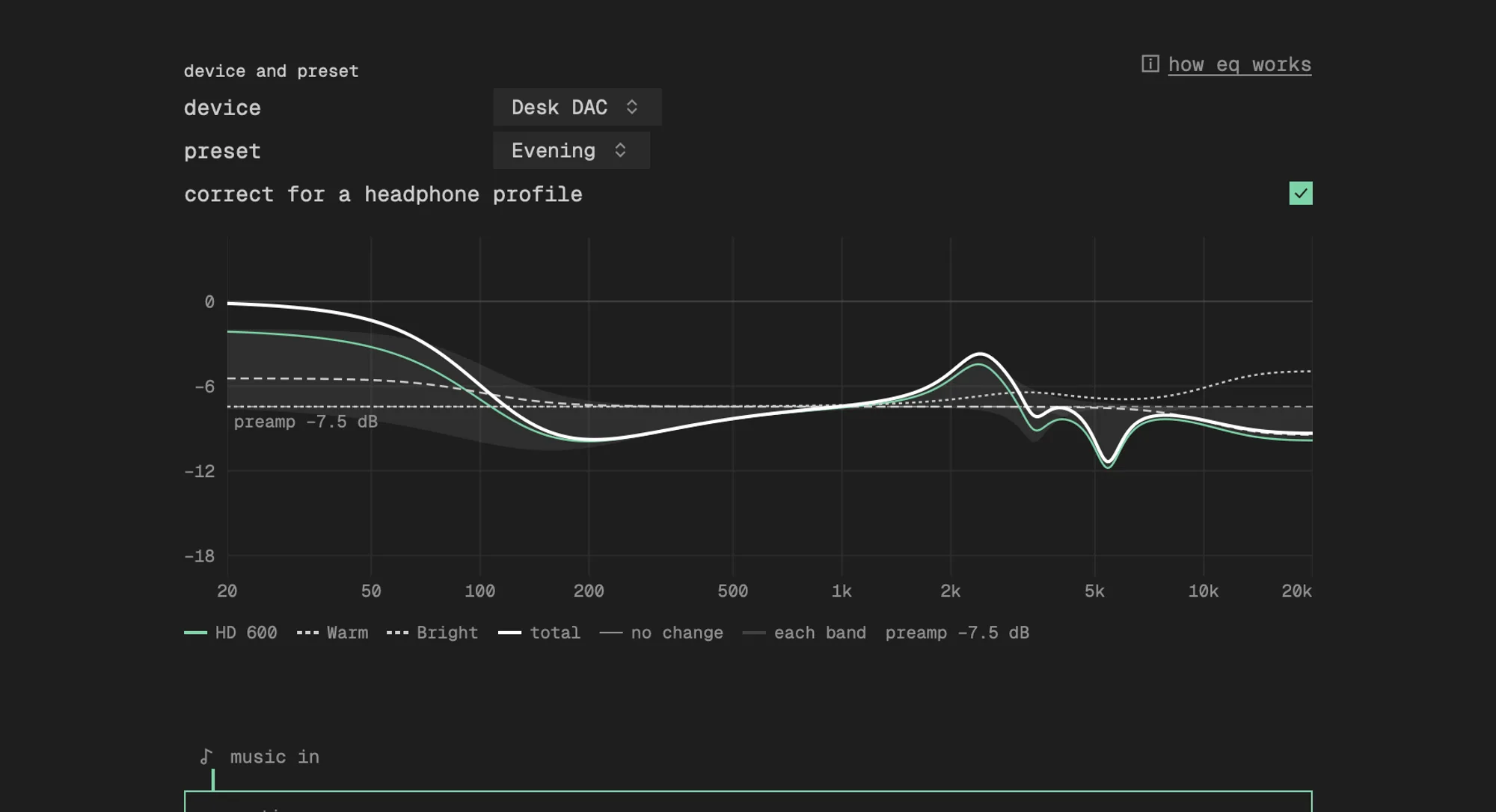
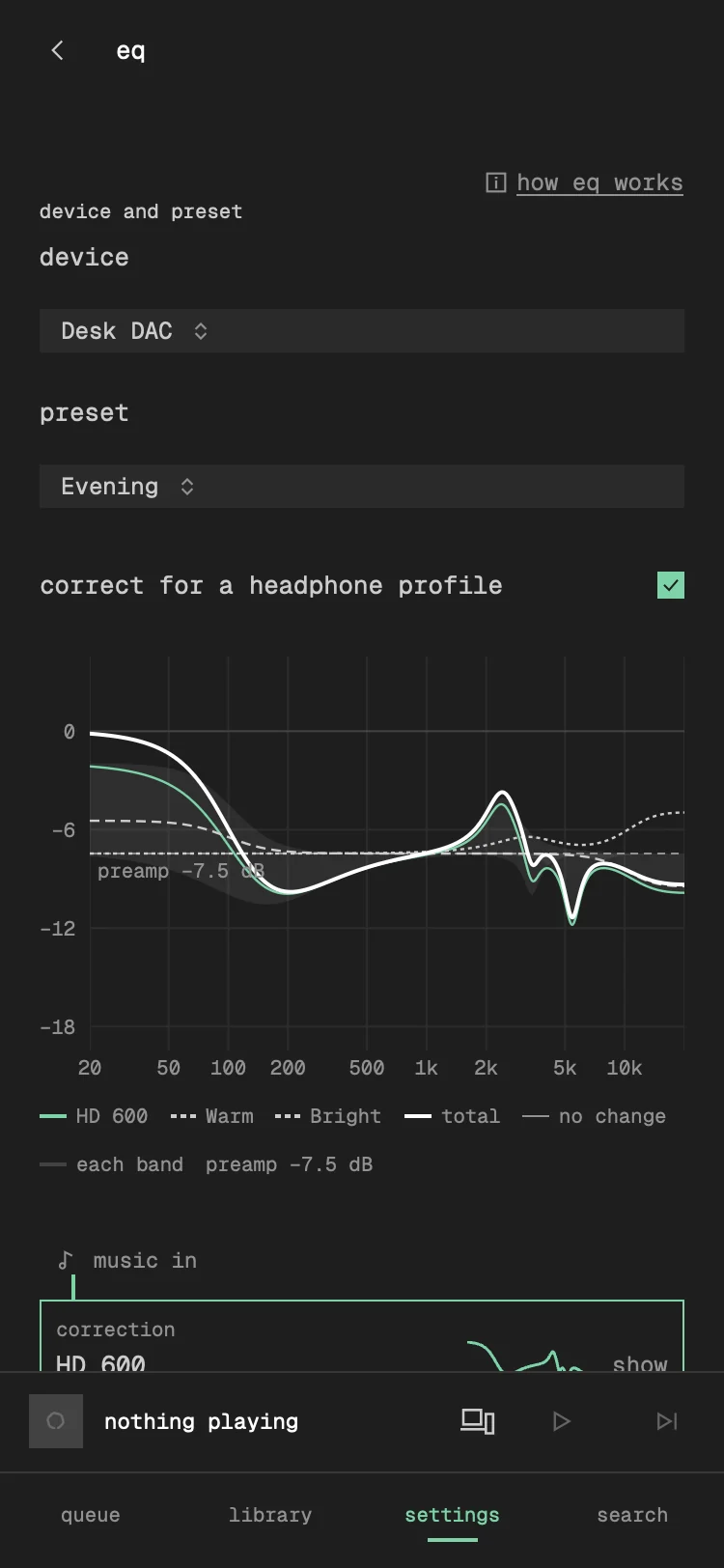
The apps' EQ page is the chain a device plays, read top to bottom: music in, the correction, the filters' EQs, the device out. Device at the top picks which device, starting with the output in use; Preset sets it from a preset, or Flat, and reads Unsaved for a chain no preset holds. Correct for a headphone profile is on unless the device plays filters alone, as speakers usually do: switched off, the device's correction is taken off it (and kept), and the page drops the correction stage and everything about targets, leaving a list of filters. A preset saved from the device carries the setting, and choosing a correction switches it back on. After a change to a device set from a preset, Save puts the change in the preset and Save as New… keeps it as another; ⓘ How EQ works explains the words.
Under them, the curve of the whole chain (the left channel's, with the right drawn too where an EQ gives the two different bands), always at the same height, so choosing another preset changes the curve and not the page; a flat device says it plays untouched. Each stage is drawn in the stroke of its block in the chain below, the correction in the accent and each EQ in a dash of its own, over the total. Each block shows its own curve. Tapping the correction chooses another, its target and a group's member, with Add… at the foot to import one, find one in AutoEQ or build one from a measurement or squig.link. Each EQ of the filters has On, and tapping it opens its page. On the iPhone, swipe it left to remove it from the filters and right to move it up or down, or touch and hold it for the same; on Android, its ⋯ menu does these; on the Mac, its Options menu or a right-click does these, and ⌫ removes the one focused. Removing takes an EQ out of the device's filters and never deletes it: only Delete… in Manage EQ does, after asking. Add EQ adds another, and New EQ… there makes one: eight bands (a low shelf at 100 Hz, six peaks an octave apart from 200 Hz, a high shelf at 10 kHz), flat or from a bass boost, warm or bright starting curve, named before it is made, added to the filters and opened to edit. An empty stage is a dashed place to add one.
On Apple TV the correction and Add EQ choose from the corrections and EQs already on the TV, which include those the account's other devices sync Everywhere. A television has no files to import and no microphone to measure with, so there is no Add…; with nothing to choose, the list says to add them on a phone or Mac.
Add EQ lists each EQ with the target it was made against. Those made against the correction's target come first, under Matches your correction and in the accent, since they play as made; the rest follow under Other. A graphic EQ is described by its points ("graphic, 127 points"), a parametric one by its bands.
The correction's block names the target it corrects to ("to Neutral, in-ear (diffuse field)"), and each EQ the target it was made against ("made for Neutral"). The line into each EQ says how the two meet. Drawn in the accent and marked Matched, the EQ was made against the correction's own target and plays as made. When the first EQ that plays is matched, and none after it was made against another target, the whole chain is drawn in the accent, so a chain that plays as made reads as one at a glance. A generic EQ stacked on top that says no target, a bass shelf say, leaves it matched. Made against another target, it shows the conversion kōan plays first ("Target difference: Neutral → Harman in-ear 2019"), which is correct and not a warning. A correction built from a measurement is instead fitted again to that target ("Correction fitted to Harman in-ear 2019 for it"): one fit to the target the EQ expects is what squig.link would give, where a fit to the correction's own target plus the difference only comes close, off by up to a decibel in places. The first EQ that asks decides the fit; later EQs made against yet another target are converted from it. The refit is dropped, and the line shows the conversion as above, where it would leave out an EQ that plays without it or add a note to the chain. Where the EQ does not say what it was made against, nothing can be converted, and if it already includes a target, as a finished preset like "Lush" does, that target is applied twice on top of the correction's. Not saying is no mismatch, since a generic EQ has no target to say, so the line only notes it, quietly, and tapping it opens the EQ's page to set Made against. A converted line draws the difference kōan plays beside its label.
An imported EQ cannot say what it was made against, so kōan offers a guess: "Looks made for Harman in-ear 2019. Use that?", on the line into it and under Made against on its page, set only when accepted. A tuning is mostly a preference said against the target beneath it, and preferences sit near Harman's, so a tuning made against neutral carries Harman's bass shelf and one made against Harman does not. Of neutral, Harman and the correction's own target, kōan offers the one whose difference from Harman the tuning matches, when it matches by at least 1.5 dB RMS (20 Hz to 10 kHz) better than the next. It offers nothing otherwise, nor for a tuning within 1.5 dB RMS of flat, which has nothing to judge by, nor for a group, whose Made against covers every member that does not say its own. The EQ's graph also draws what it adds on the correction in use with the target chosen, and on a phone each Made against choice shows that curve, so a wrong choice shows as a bass shelf doubled or taken out. Made against lists the targets for the kind of headphone the correction is for first, and the rest under Other. Why an EQ is left out, such as a correction with a tuning in it chosen as a tuning, is said on the line into it. VoiceOver reads each of these after the chain's sentence. Each EQ's page draws its own curve. The curve is computed by the core from the same filters and impulse responses the DSP runs, at 48 kHz, so it shows what plays rather than what the filters were meant to do, the EQs it plays and a moved target included. The graph is drawn at the level the EQ plays at: the curve is moved by the preamp, and a dashed line at that level is labelled with it ("preamp −5.0 dB"). A profile whose file states its gain as a filter, such as a CamillaDSP Gain, draws the same as one that states it as a preamp, so the two read alike. On the Mac and iPhone the graph stays at the top of the page while the bands scroll under it. On iPhone it goes short while a band's figure is typed, so the row stays in view above the keyboard, whose bar steps to the previous or next figure and has Done to keep the value. The curve is the left channel's; where the right channel plays something else, it is drawn beside it. Each parametric band is drawn faintly behind the total. For a correction from AutoEQ, the Measured view draws the device as measured, the target it plays to, and the measurement with the correction applied.
A tuning's bands are edited on its own page, opened from its block on the EQ page: in the table below its graph, or on the graph itself. Drag a peak or shelf's handle for its frequency and gain, and pinch it, or drag it with Option held on the Mac, for its Q. A graphic curve is painted: drag anywhere across the graph away from the handles (a drag up or down scrolls the page) and the curve follows, with the brush under the graph moving the nearest point alone or its neighbours too, over a third of an octave or an octave. The graph follows the drag as it goes, drawn by the core without saving; the edit is saved and heard at most four times a second while the drag goes on, and once when it ends, so the DSP is rebuilt for the edit and never for every frame of it. Frequency is held to 10 Hz–22 kHz, gain to ±30 dB and Q to 0.1–20, each only when it is the figure being changed: an imported band past a limit, such as a Q of 30 from REW, keeps that figure while its gain or frequency is edited, so the profile still matches its file. A graphic curve's row opens a page of its points, each frequency and gain editable within the same limits; a point moved past another takes its place in order. Delays and mixes are shown but not edited here.
In the desktop app an edit names the band it started on. When that band was changed, moved or removed meanwhile, on another device or elsewhere on the page, the edit is dropped rather than written over whatever filter now has its place, and the page shows the filters as they are. A figure in the table is saved only when its text is changed, so a band keeps every digit its file gave it however many places the table shows.
An EQ of bands alone is Mono, one list for both channels, or Stereo, one for each. Stereo starts each channel with a copy of the list, and Editing picks which channel the graph, its handles and the table show; the other channel's curve is drawn beside it. Going back to Mono when the two lists differ asks which channel to keep. A mono recording plays the left channel's bands, and an output with more than two channels has the stereo lists on its front left and right alone; its other channels play no bands.
A correction plays as made: its bands are shown and not edited, since a correction is what makes the device neutral and an edit to it is no longer that. To change the sound, add filters on top; to edit a correction anyway, make it a tuning on its page first.
Once a tuning is edited, Save as Copy… on its page keeps the edit as an EQ of its own, named "
An imported EQ keeps what it was imported as. Once edited, Reset to File on its page or koan dsp revert NAME puts it back, and koan dsp copy NAME keeps the edit as an EQ of its own first. EQs imported before this was kept have nothing to go back to.
Filters of several EQs, and presets
An output's filters can hold several EQs, played in order after the correction, each switched on or off. Each EQ made against a target other than the correction's has the difference between the two played with it, and where the chain cannot hold them all, the last ones are left out and the EQ page says which. A preset saves an output's correction and filters under a name; an output set from it plays the same, and says when it was changed since. A changed output can be saved over the preset, saved as a new one, or reverted to the preset as saved, which is setting it from the preset again; the quick preset menus list the edited chain and the saved preset side by side. An EQ made before presets that played a correction with EQs on top became a preset, and the outputs that played it play its correction and EQs, set from it.
The CLI does the same, still calling the filters a tuning: koan dsp set DEVICE --correction NAME --tuning EQ,EQ, koan dsp preset save NAME and koan dsp preset use NAME|flat (which also reverts an edited output to the preset), with koan dsp show to read it back.
Configs from before Flat with processing switched off open with every device flat, and what each played kept as a preset named for the device, unless it was already set from a preset and not changed since.
On every device
Signed in to a kōan server, an EQ can be kept on every device of the account. Each EQ's Sync is either Everywhere or This device, chosen on its page; signed in to any other server, or to none, there is no choice to make and the page leaves it out. One synced everywhere goes through the server: filters, preamp, target, the EQs it plays and the files in its folder (impulse responses, a routing .cfg, AutoEQ's measurement). Which output plays it is not synced, since the headphones on a Mac's DAC are not the AirPods on a phone; each device assigns it to its own outputs.
Where it is kept follows from what it is until chosen. A correction installed from AutoEQ, an EQ of bands made by hand, and an EQ that plays only EQs kept everywhere go everywhere: headphones move between devices. An EQ with impulse responses, a room or speaker correction, stays on its device, as does one assigned to a built-in output or a network amplifier. The first time a device syncs, the EQs it already had stay on it unless they came from AutoEQ, so nothing leaves a device that was not made to travel or chosen to. Once an EQ has synced, it stays everywhere until This device is chosen for it: assigning it to a built-in output, giving it an impulse response or adding an EQ kept on one device to it does not take it off the other devices.
An EQ kept everywhere cannot play one kept on one device, since the other devices would not have it: adding one is refused, as is moving an EQ such an EQ plays to one device. An EQ kept on one device may play EQs kept everywhere, such as a speaker correction with a shared bass shelf on top.
Each EQ carries an id of its own, so a rename reaches every device. When two devices change one EQ, the later change wins, counted from when it was made, so a change made offline keeps its time. Deleting an EQ reaches every device; so does moving an EQ to one device, which removes it from the others. Nothing else does: an EQ missing from a device without having been deleted there, after a config file that did not load or was edited by hand, is taken from the server again rather than deleted everywhere. The server keeps a copy of a deleted EQ, its files included, for thirty days after it records the deletion. An EQ elsewhere that played a deleted one reports it missing. Manage EQ in the desktop, iOS and Android apps lists deleted EQs under Recently deleted, with the days each has left, and Restore brings one back on every device as a new edit. The section is there whenever the server offers it (koanDspDeleted: older servers and Navidrome do not), saying so when nothing has been deleted, and not while offline. An EQ whose files never reached the server before it was deleted cannot be restored. The same EQ made on two devices before either synced, such as one headphone installed from AutoEQ on both, becomes one EQ. "The same" is what they play, not how they are written: bands in another order, or a gain a few hundredths of a decibel apart, are the same EQ. Two EQs of one name that would sound different are both kept, each renamed for the device it came from ("Lush (Mac Studio)", "Lush (iPhone)"), and each EQ's page says why. EQs that play them follow the new names.
A file may be up to 32 MB, and an account's files up to 256 MB together. An EQ past either stays on its device, and its page says it could not be kept. Turning down AutoEQ's suggestion for an output holds on every device.
The server keeps the EQs in its database, per account, and offers them as the koanDspProfiles extension. Against a server without it, EQs stay on each device as before.
Bounds
Whatever an EQ says, it plays within bounds: gains and the preamp within ±30 dB, a delay at most two seconds, Q from 0.01 to 100 and frequencies from 1 Hz to 48 kHz, at most 64 bands on a channel and 256 filters in all. A value past a bound is clamped to it, one that is not a number is dropped with its filter, and the EQ's page says what was adjusted. The config keeps what was written; EQs synced from another device arrive already adjusted.
The whole chain an EQ plays, the EQs it plays and a moved target included, has budgets of its own: two seconds of delay on a channel in all, two graphic curves on a channel, eight mixes, and impulse responses of at most 262,145 taps (Harman's 780 pack at 192 kHz, the longest known to ship). The largest chain these allow runs about 30 times faster than real time at 48 kHz and five times at 192 kHz on an M-series Mac. A preamp set by hand that leaves the filters' peak above full scale is lowered to the headroom they need, and whatever the chain puts out is held within full scale, with anything that is not a number turned to silence, before it reaches the device.
Sample rates
An impulse response is only correct at the rate it was designed for. When a track's rate has a response of its own, it is used and nothing is resampled. When it has none, kōan resamples the track to the nearest rate it has a response for and plays at that rate, and the badge says so ("FLAC 24/96 → 48 · FIR"). Resampling the filter instead would be worse: a filter designed at 48 kHz holds nothing above 24 kHz, so on hi-res material it acts as a low-pass. With a single response everything plays at one rate, so the device never changes rate between tracks and gapless holds across tracks of different rates.
A linear-phase filter delays the audio by its group delay, often tens of milliseconds. kōan trims that delay from the start of playback and plays it out at the end, so the seek bar and synced lyrics line up with what is heard.
Precision
Everything between the decoder and the device runs in 64-bit floating point: resampling, the bands and convolution, with one conversion in and one out. A test subtracts a textbook convolution, summed tap by tap, from kōan's output; what is left is −152 dB, the rounding of the 32-bit samples the output takes. A 262,145-tap Roon filter at 192 kHz, stereo, runs at 37 times real time on one core of an M-series Mac.
Headroom
EQ boosts and convolution can push a sample past full scale. Unless an EQ sets preamp_db itself, kōan works out the largest gain its filters apply at any frequency and lowers the level by that much first, as AutoEQ's own Preamp line does. With a tuning on top of a correction, the level comes from what the whole chain plays, not the correction's own preamp, so a correction and tuning whose boosts cancel play as loud as a single EQ with the same curve and A/B comparisons are fair. This holds for a preamp set by hand on the correction too: with a tuning on, the chain's derived preamp replaces it, and it applies again only when the correction plays alone. ReplayGain is applied before it, with its own peak limiting, so the two do not compound. An EQ's page shows the figure.
Choosing
Manage EQ, at the foot of the EQ page, lists every correction, EQ and preset, each with the devices it is used on. A group is a heading over its members; a group of EQs can be added to the tuning whole. Each row's Options opens it, renames it, saves it as a new one, reverts an import that was changed, keeps it on every device or this one, and deletes it, saying first where it is used. Files, AutoEQ and measurements come in from its foot; several files at once become a group.
The preset menu is the quick way to switch: Flat, each preset, and Edit…, which opens the EQ page for that device. Its button is the slider glyph, in the accent whenever the output is set to anything but Flat; the menu names the preset. On the Mac the transport bar also names it beside the glyph, for the output playing, and the slider button beside each output under the speaker sets that output whether or not it is the one playing. While what is heard is processed, the speaker carries a dot and the terminal UI's format badge names the processing. Each EQ's page shows exactly what it holds — every response's rate, channels, length, where it peaks and whether it mixes or delays channels, any bands, the headroom, and where it was imported from. Changes apply straight away, where playback is.
On iOS, the route is the device: AirPods, wired headphones and the speaker are each their own output. Now Playing shows the route's preset as the slider glyph, beside Play on and Output, which are glyphs too. Tapping it picks another preset for that output, which applies at once. It changes when the output does. On Apple TV the same menu has no Edit….
koan dsp                                        # what the current output plays
koan dsp set "Topping E30" --correction "Living room"   # correct it with Living room
koan dsp flat "Topping E30"                     # it plays untouched
koan dsp list                                   # every correction, EQ and preset
koan dsp remove "Living room"
Configuration
EQs describe the listening setup rather than taste, so they live in config.local.toml. Importing writes them there; they are plain TOML to edit by hand too:
[dsp]
enabled = true    # false, from before Flat, makes every device flat at start

[[dsp.profiles]]
name = "Living room"
devices = ["Topping E30"]
impulses = ["dsp/living-room/44100.wav", "dsp/living-room/48000.cfg"]
# preamp_db = -6.0  # leave unset to derive it from the filters
filters = [
    { type = "peaking", freq = 46.5, gain_db = -9.4, q = 4.47 },
    { type = "low_shelf", freq = 105.0, gain_db = 5.5, q = 0.7, channels = [1] },
    { type = "delay", ms = 0.25, channels = [0] },
    { type = "mix", outputs = [[[0, 0.9], [1, 0.1]], [[0, 0.1], [1, 0.9]]] },
    { type = "graphic", points = [[20.0, -1.5], [1000.0, 0.0], [10000.0, 2.0]] },
]
impulses entries are WAVs (any audio file) or Convolver .cfg files, relative to the config directory. filters run in order, before the responses. channels counts from 0 and, left out, means every channel.
| Type | Fields |
|---|---|
peaking, low_shelf, high_shelf, low_pass, high_pass, notch, band_pass, all_pass |
freq, gain_db, q |
low_shelf_first_order, high_shelf_first_order |
freq, gain_db: 6 dB per octave, half the gain at freq |
low_pass_first_order, high_pass_first_order, all_pass_first_order |
freq |
gain |
gain_db |
delay |
ms and samples, added together; subsample = true keeps the fraction of a sample rather than rounding it |
mix |
outputs: for each channel from 0, the [input, linear gain] pairs it is made of, every input read before any is written. An empty list is silence; channels past the list pass unchanged |
graphic |
points: [Hz, dB] pairs |
A filter at or above half the sample rate cannot be built and is skipped at that rate, with a line in the log.